> ## Documentation Index
> Fetch the complete documentation index at: https://signalschools.co.uk/docs/llms.txt
> Use this file to discover all available pages before exploring further.
# Action Plans
> Action plans in Signal are structured intervention plans for students — behaviour plans, SEN support, medical care plans, and more. Learn how they work, what they include, and how to track progress.
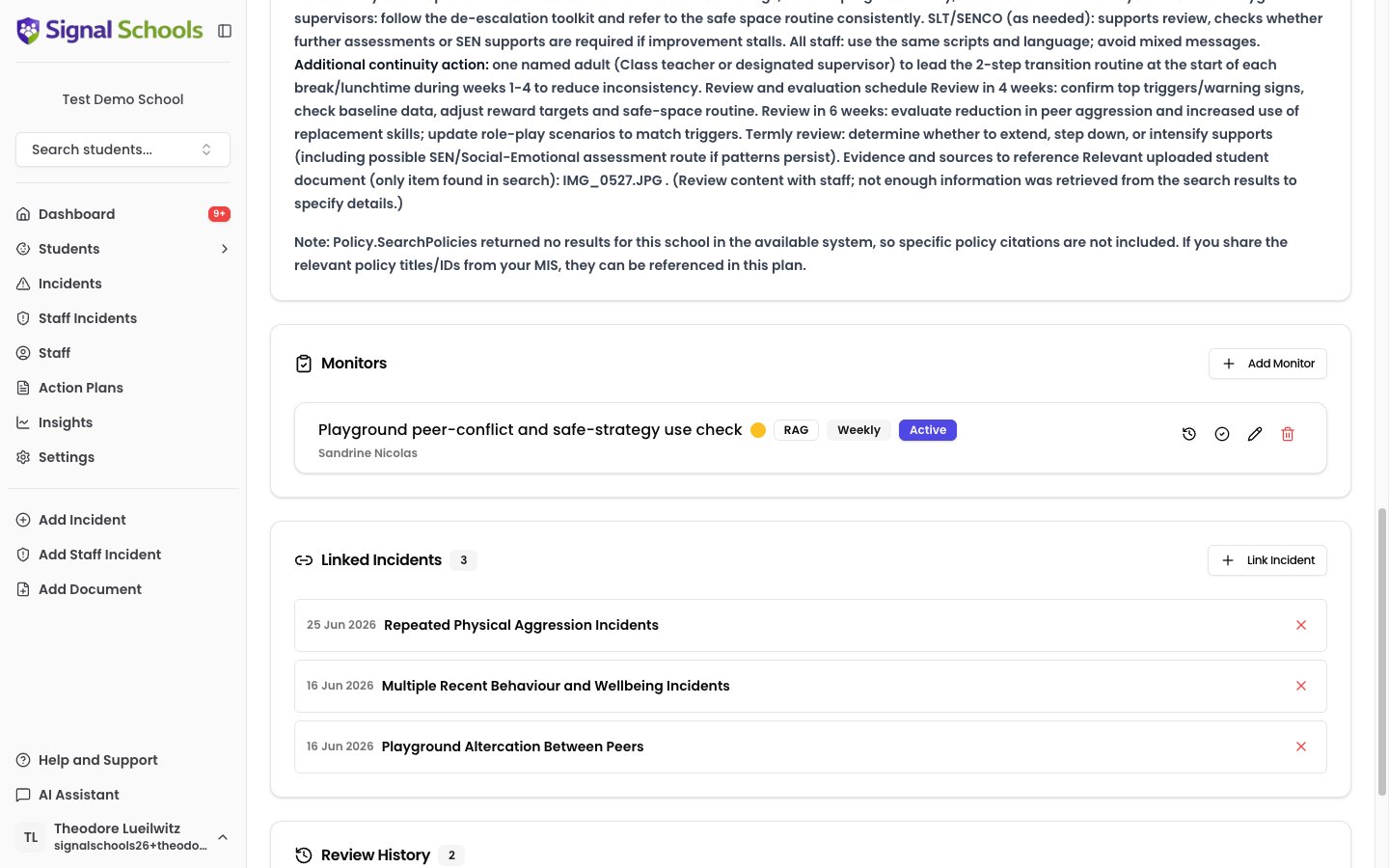
An action plan is a structured intervention plan for a student. Whether it is a behaviour plan, SEN support plan, medical care plan, or any other type of intervention, action plans bring together the plan itself, the incidents that prompted it, scheduled reviews, and ongoing monitoring — all in one place.
 ## Key components
Every action plan in Signal includes the following:
### Type
Each action plan has a type that describes what kind of intervention it is. Your school defines its own types — for example, Behavioural, Medical, Learning Support, or Pastoral. Types are fully configurable in settings.
### Content
The plan itself — what the intervention involves, what actions will be taken, and what outcomes are expected. You can write this manually or use Signal's AI to generate a draft based on the plan type and linked incidents. You always review and edit the content before publishing.
### Linked incidents
Action plans are connected to the student incidents that prompted or relate to the intervention. Linking incidents gives context to the plan and helps reviewers understand the safeguarding picture behind it.
### Reviews
Action plans can be scheduled for periodic review to assess progress and make adjustments. Upcoming reviews appear on your dashboard so nothing is missed. Signal's AI can assist with the review process by analysing recent incidents and monitor data to suggest updates, highlighting what strategies are working and what needs to change.
### Monitors
Monitors are scheduled check-ins attached to the plan. They ensure ongoing oversight of the student's progress between formal reviews. Each monitor is assigned to a staff member with a defined frequency. See [Monitors & Check-ins](/docs/action-plans/monitors) for full details.
## Action plan lifecycle
An action plan follows a clear path from creation through to completion:
1. **Create** — set the type, choose the student, write or generate the plan content, and link relevant incidents.
2. **Active** — the plan is live. Staff carry out the interventions, monitors track progress, and the plan is reviewed periodically.
3. **Review** — at scheduled intervals, the plan is reviewed and updated. Reviews are recorded to build a history of decisions and changes.
4. **Complete** — when the intervention is complete or no longer needed, the plan is marked as completed. All active monitors are automatically ended when a plan is completed. You can also download a PDF of the completed plan for your records.
Completed plans can be reopened if circumstances change and the intervention needs to resume.
## Learn more
Step-by-step guide to creating, editing, reviewing, and completing action plans.
Set up scheduled check-ins to track student progress within an action plan.
Action plan types are configured in **Settings > Action Plan Types**. Your school can create as many types as needed to reflect the interventions you use.
## Key components
Every action plan in Signal includes the following:
### Type
Each action plan has a type that describes what kind of intervention it is. Your school defines its own types — for example, Behavioural, Medical, Learning Support, or Pastoral. Types are fully configurable in settings.
### Content
The plan itself — what the intervention involves, what actions will be taken, and what outcomes are expected. You can write this manually or use Signal's AI to generate a draft based on the plan type and linked incidents. You always review and edit the content before publishing.
### Linked incidents
Action plans are connected to the student incidents that prompted or relate to the intervention. Linking incidents gives context to the plan and helps reviewers understand the safeguarding picture behind it.
### Reviews
Action plans can be scheduled for periodic review to assess progress and make adjustments. Upcoming reviews appear on your dashboard so nothing is missed. Signal's AI can assist with the review process by analysing recent incidents and monitor data to suggest updates, highlighting what strategies are working and what needs to change.
### Monitors
Monitors are scheduled check-ins attached to the plan. They ensure ongoing oversight of the student's progress between formal reviews. Each monitor is assigned to a staff member with a defined frequency. See [Monitors & Check-ins](/docs/action-plans/monitors) for full details.
## Action plan lifecycle
An action plan follows a clear path from creation through to completion:
1. **Create** — set the type, choose the student, write or generate the plan content, and link relevant incidents.
2. **Active** — the plan is live. Staff carry out the interventions, monitors track progress, and the plan is reviewed periodically.
3. **Review** — at scheduled intervals, the plan is reviewed and updated. Reviews are recorded to build a history of decisions and changes.
4. **Complete** — when the intervention is complete or no longer needed, the plan is marked as completed. All active monitors are automatically ended when a plan is completed. You can also download a PDF of the completed plan for your records.
Completed plans can be reopened if circumstances change and the intervention needs to resume.
## Learn more
Step-by-step guide to creating, editing, reviewing, and completing action plans.
Set up scheduled check-ins to track student progress within an action plan.
Action plan types are configured in **Settings > Action Plan Types**. Your school can create as many types as needed to reflect the interventions you use.