> ## Documentation Index
> Fetch the complete documentation index at: https://signalschools.co.uk/docs/llms.txt
> Use this file to discover all available pages before exploring further.
# Safeguarding Policies
> Upload your school's policy documents to Signal, keep them on a review schedule, and use AI to match policies to incidents and check them against current government guidance.
Your school's safeguarding policies are the foundation of how you respond to concerns. Signal lets you upload these documents so staff always have the right guidance at their fingertips, keeps every policy on a review schedule so nothing lapses, and uses AI both to connect policies to incidents and to check your policies against the latest government guidance.
 ## What policies are in Signal
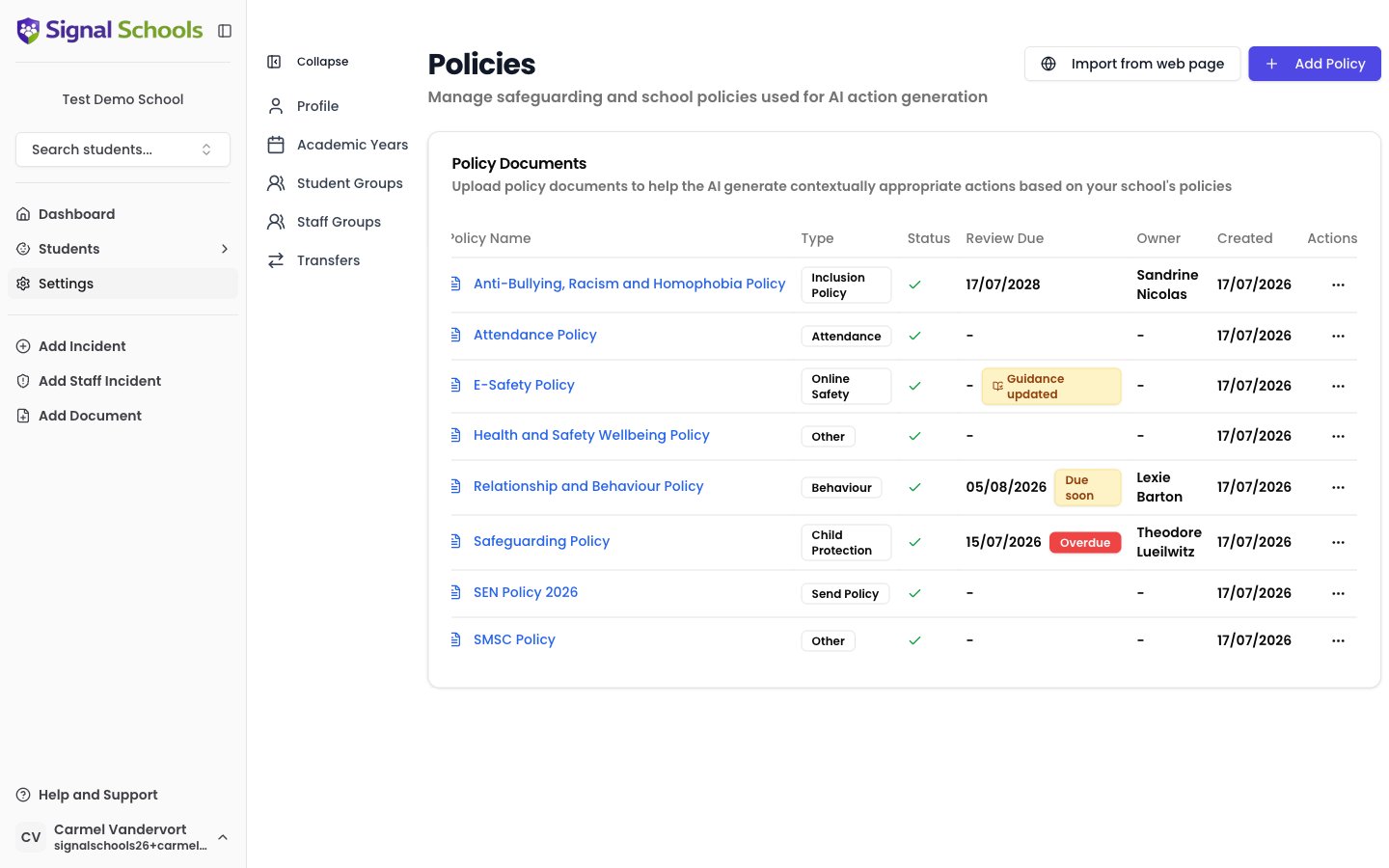
Policies in Signal are your school's own safeguarding and welfare policy documents. You upload the actual files — PDF or Word documents — and Signal stores them securely alongside your incident records.
Once uploaded, policies serve three purposes:
* **Reference for staff** — anyone recording or reviewing an incident can quickly access the relevant policy guidance without searching through shared drives or filing cabinets.
* **AI matching** — Signal's AI reads your policy documents and automatically identifies which ones are relevant when an incident is recorded.
* **Review assurance** — Signal tracks when each policy is next due for review, reminds the right people, and can run an AI review comparing the policy against current government guidance.
## Policy Types
Each policy is assigned a **Policy Type** that reflects its subject area:
| Type | Examples |
| ------------------------------------- | ---------------------------------------------------------------------------------- |
| **Child Protection & Safeguarding** | Combined child protection and safeguarding policy, managing allegations procedures |
| **Staff Behaviour / Code of Conduct** | Staff code of conduct, low-level concerns procedures |
| **Safer Recruitment** | Safer recruitment policy, vetting and checking procedures |
| **Children Missing Education** | Children missing education policy |
| **Allergy Safety** | Allergy safety policy, allergen management procedures |
| **Behaviour Management** | Behaviour policy, exclusions policy, rewards and sanctions |
| **Attendance** | Attendance policy |
| **Anti-Bullying** | Anti-bullying policy, peer-on-peer abuse guidance |
| **Online Safety** | Online safety policy, acceptable use policy, filtering and monitoring |
| **SEND** | SEND policy, accessibility plan, SEND information report |
| **Inclusion** | Inclusion policy, equality and diversity policy |
| **Other** | Any policy that does not fit the types above |
Policy Types organise your policy library, improve the accuracy of AI matching, and determine which government guidance documents each policy is checked against during an [AI review](/docs/policies/ai-policy-review).
## How AI uses your policies
When a staff member records an incident, Signal's AI analyses the description and compares it against all uploaded policy documents. It identifies which policies are most relevant based on the content of both the incident and the policies themselves.
This means staff see the applicable guidance without having to search for it. The AI highlights relevant sections and excerpts, making it easy to follow the correct procedures.
The more policies you upload, the better the AI matching becomes. A comprehensive policy library gives Signal the fullest picture of your school's procedures, leading to more accurate and useful recommendations.
## Keeping policies up to date
Signal helps you keep your policy suite current in three ways:
* **Review dates and reminders** — set a review frequency and owner for each policy, and Signal flags policies that are due soon or overdue on the policies page, the dashboard, and in the daily digest. See [Review Dates & Reminders](/docs/policies/review-dates).
* **AI policy review** — run an on-demand AI comparison of a policy against the current editions of relevant government guidance, producing a findings report with citations and suggested wording. See [AI Policy Review](/docs/policies/ai-policy-review).
* **Government guidance monitoring** — Signal checks GOV.UK weekly for new editions of key guidance such as Keeping Children Safe in Education. When guidance changes, a banner tells you what changed and which policies it affects, and those policies are flagged with a **Guidance updated** badge. See [Guidance Update Alerts](/docs/policies/guidance-updates).
When a policy is revised, replace the document with the new version so the AI always matches against your current guidance. Replacing a document re-processes it, and past incidents keep their original policy references.
## Learn more
Upload, classify, and manage your school's policy documents.
Keep every policy on a review schedule with owners, reminders, and due-date tracking.
Check a policy against current government guidance and get a findings report.
See when government guidance changes, what changed, and dismiss the alert.
See how AI matches policies to incidents and how staff use them.
You need the **DSL** or **Owner** role to add, edit, or remove policies. All staff with incident access can view policies that are matched to incidents.
## What policies are in Signal
Policies in Signal are your school's own safeguarding and welfare policy documents. You upload the actual files — PDF or Word documents — and Signal stores them securely alongside your incident records.
Once uploaded, policies serve three purposes:
* **Reference for staff** — anyone recording or reviewing an incident can quickly access the relevant policy guidance without searching through shared drives or filing cabinets.
* **AI matching** — Signal's AI reads your policy documents and automatically identifies which ones are relevant when an incident is recorded.
* **Review assurance** — Signal tracks when each policy is next due for review, reminds the right people, and can run an AI review comparing the policy against current government guidance.
## Policy Types
Each policy is assigned a **Policy Type** that reflects its subject area:
| Type | Examples |
| ------------------------------------- | ---------------------------------------------------------------------------------- |
| **Child Protection & Safeguarding** | Combined child protection and safeguarding policy, managing allegations procedures |
| **Staff Behaviour / Code of Conduct** | Staff code of conduct, low-level concerns procedures |
| **Safer Recruitment** | Safer recruitment policy, vetting and checking procedures |
| **Children Missing Education** | Children missing education policy |
| **Allergy Safety** | Allergy safety policy, allergen management procedures |
| **Behaviour Management** | Behaviour policy, exclusions policy, rewards and sanctions |
| **Attendance** | Attendance policy |
| **Anti-Bullying** | Anti-bullying policy, peer-on-peer abuse guidance |
| **Online Safety** | Online safety policy, acceptable use policy, filtering and monitoring |
| **SEND** | SEND policy, accessibility plan, SEND information report |
| **Inclusion** | Inclusion policy, equality and diversity policy |
| **Other** | Any policy that does not fit the types above |
Policy Types organise your policy library, improve the accuracy of AI matching, and determine which government guidance documents each policy is checked against during an [AI review](/docs/policies/ai-policy-review).
## How AI uses your policies
When a staff member records an incident, Signal's AI analyses the description and compares it against all uploaded policy documents. It identifies which policies are most relevant based on the content of both the incident and the policies themselves.
This means staff see the applicable guidance without having to search for it. The AI highlights relevant sections and excerpts, making it easy to follow the correct procedures.
The more policies you upload, the better the AI matching becomes. A comprehensive policy library gives Signal the fullest picture of your school's procedures, leading to more accurate and useful recommendations.
## Keeping policies up to date
Signal helps you keep your policy suite current in three ways:
* **Review dates and reminders** — set a review frequency and owner for each policy, and Signal flags policies that are due soon or overdue on the policies page, the dashboard, and in the daily digest. See [Review Dates & Reminders](/docs/policies/review-dates).
* **AI policy review** — run an on-demand AI comparison of a policy against the current editions of relevant government guidance, producing a findings report with citations and suggested wording. See [AI Policy Review](/docs/policies/ai-policy-review).
* **Government guidance monitoring** — Signal checks GOV.UK weekly for new editions of key guidance such as Keeping Children Safe in Education. When guidance changes, a banner tells you what changed and which policies it affects, and those policies are flagged with a **Guidance updated** badge. See [Guidance Update Alerts](/docs/policies/guidance-updates).
When a policy is revised, replace the document with the new version so the AI always matches against your current guidance. Replacing a document re-processes it, and past incidents keep their original policy references.
## Learn more
Upload, classify, and manage your school's policy documents.
Keep every policy on a review schedule with owners, reminders, and due-date tracking.
Check a policy against current government guidance and get a findings report.
See when government guidance changes, what changed, and dismiss the alert.
See how AI matches policies to incidents and how staff use them.
You need the **DSL** or **Owner** role to add, edit, or remove policies. All staff with incident access can view policies that are matched to incidents.