> ## Documentation Index
> Fetch the complete documentation index at: https://signalschools.co.uk/docs/llms.txt
> Use this file to discover all available pages before exploring further.
# Review Dates & Reminders
> Keep every policy on a review schedule with owners, review frequencies, due-date badges, dashboard reminders, and a simple mark-as-reviewed workflow.
Schools are expected to review their policies regularly — many annually — and it is easy for a review date to slip past unnoticed. Signal tracks the review schedule for every policy, shows clear badges when a review is approaching or overdue, and reminds the right person so nothing lapses.
You need the **DSL** or **Owner** role to manage policies and mark them as reviewed.
## Setting up the review schedule
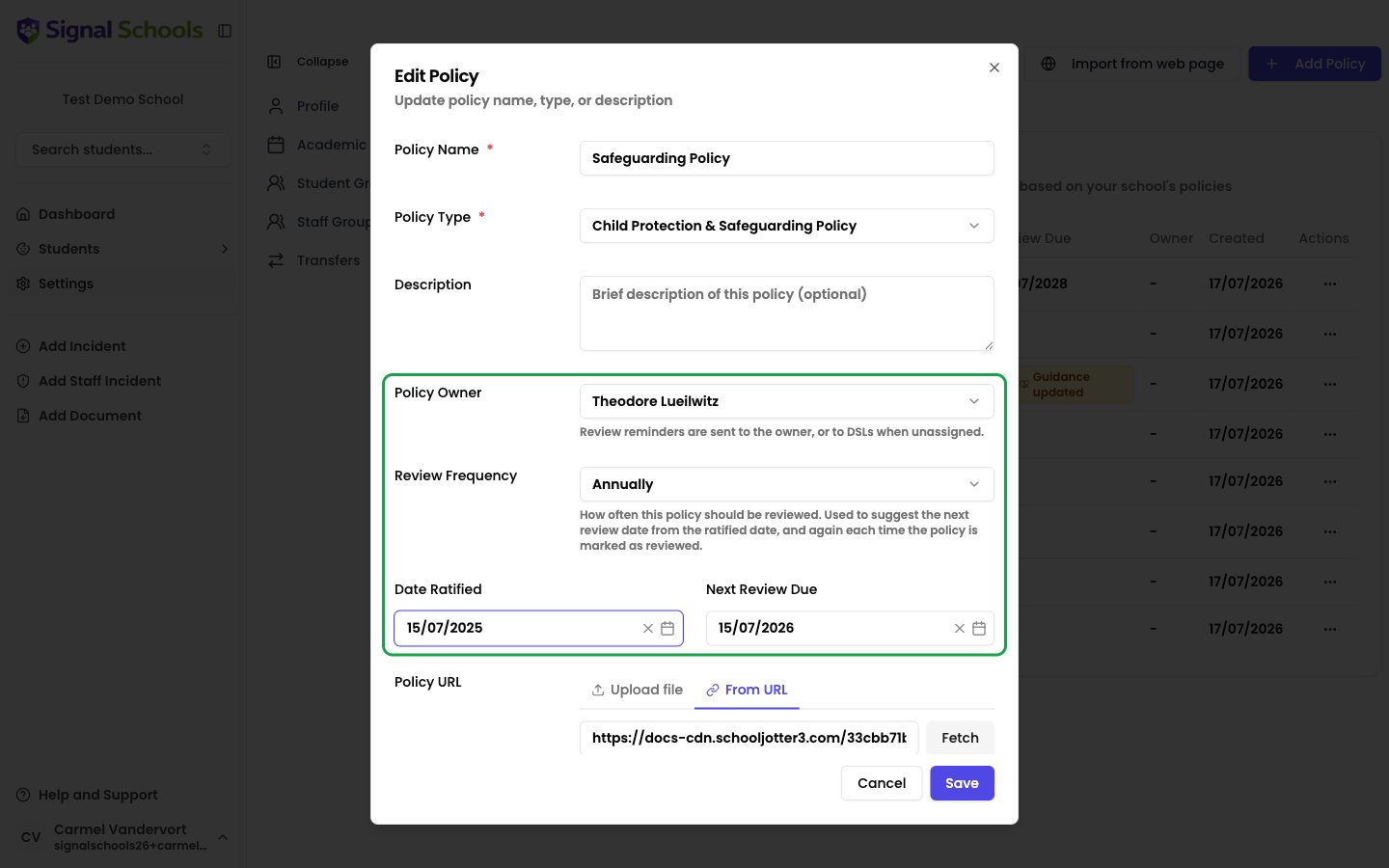
When you add or edit a policy, four fields control its review schedule:
* **Policy Owner** — the staff member responsible for keeping the policy up to date. Review reminders go to the owner. Leave this set to **DSLs** and reminders go to your safeguarding leads instead.
* **Review Frequency** — how often the policy should be reviewed: **Annually**, **Every 2 years**, or **Every 3 years**.
* **Date Ratified** — when the current version of the policy was approved.
* **Next Review Due** — when the next review is due.
You do not need to work out the next review date yourself. When you set a ratified date and a review frequency, Signal suggests the next review date automatically — for example, a policy ratified on 1 September with an annual frequency is suggested a review date of 1 September next year. You can adjust the suggested date before saving.
 ## Review status badges
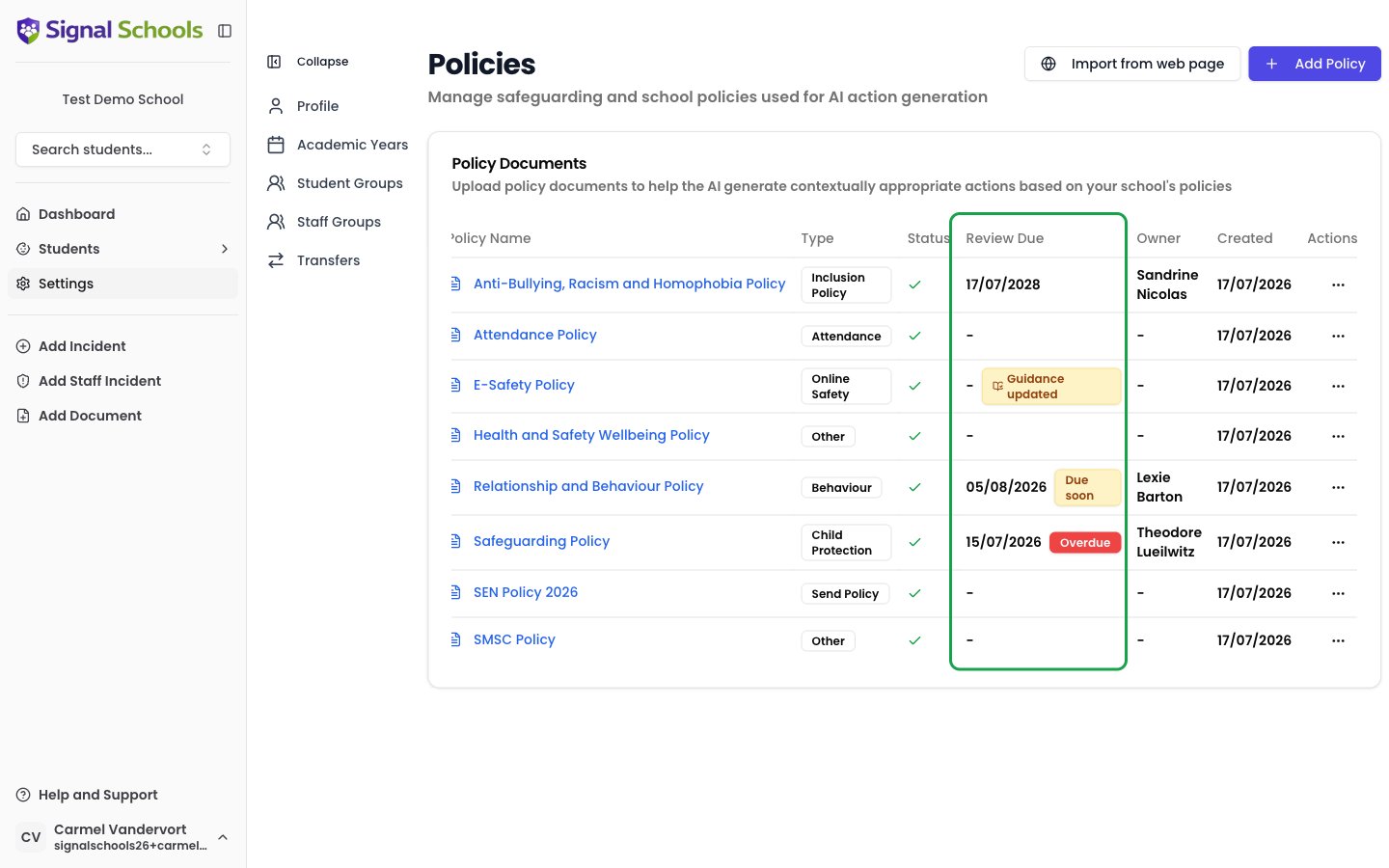
The **Review Due** column on the policies page (**Settings → Policies**) shows each policy's next review date alongside a status badge:
* **Due soon** (amber) — the review date is within the next 30 days.
* **Overdue** (red) — the review date has passed.
* **Guidance updated** (amber, with a book icon) — government guidance relevant to this policy has changed since it was last reviewed, so a review is recommended even if the date is not yet due. This badge stays until the policy is marked as reviewed, even if the [guidance update alert](/docs/policies/guidance-updates) has been dismissed.
## Review status badges
The **Review Due** column on the policies page (**Settings → Policies**) shows each policy's next review date alongside a status badge:
* **Due soon** (amber) — the review date is within the next 30 days.
* **Overdue** (red) — the review date has passed.
* **Guidance updated** (amber, with a book icon) — government guidance relevant to this policy has changed since it was last reviewed, so a review is recommended even if the date is not yet due. This badge stays until the policy is marked as reviewed, even if the [guidance update alert](/docs/policies/guidance-updates) has been dismissed.
 ## Where reminders appear
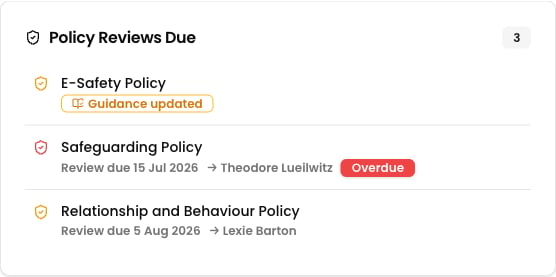
The **Policy Reviews Due** section on the dashboard lists policies that are due soon, overdue, or flagged for a guidance update, along with their review date and owner. Policies listed only because of a guidance update drop off once that [alert is dismissed](/docs/policies/guidance-updates) — those that are due or overdue stay.
The daily digest includes a count of policies due for review, with a link straight to the policies page.
Reminders are routed to the **Policy Owner** where one is set. Policies without an owner fall back to your DSLs, so every policy always has someone watching its review date.
## Where reminders appear
The **Policy Reviews Due** section on the dashboard lists policies that are due soon, overdue, or flagged for a guidance update, along with their review date and owner. Policies listed only because of a guidance update drop off once that [alert is dismissed](/docs/policies/guidance-updates) — those that are due or overdue stay.
The daily digest includes a count of policies due for review, with a link straight to the policies page.
Reminders are routed to the **Policy Owner** where one is set. Policies without an owner fall back to your DSLs, so every policy always has someone watching its review date.
 ## Marking a policy as reviewed
When a review is complete, record it in Signal so the badges clear and the next review date is set.
### Open the actions menu
Go to **Settings → Policies**, open the **⋯** actions menu on the policy's row, and choose **Mark as reviewed**.
### Confirm the dates
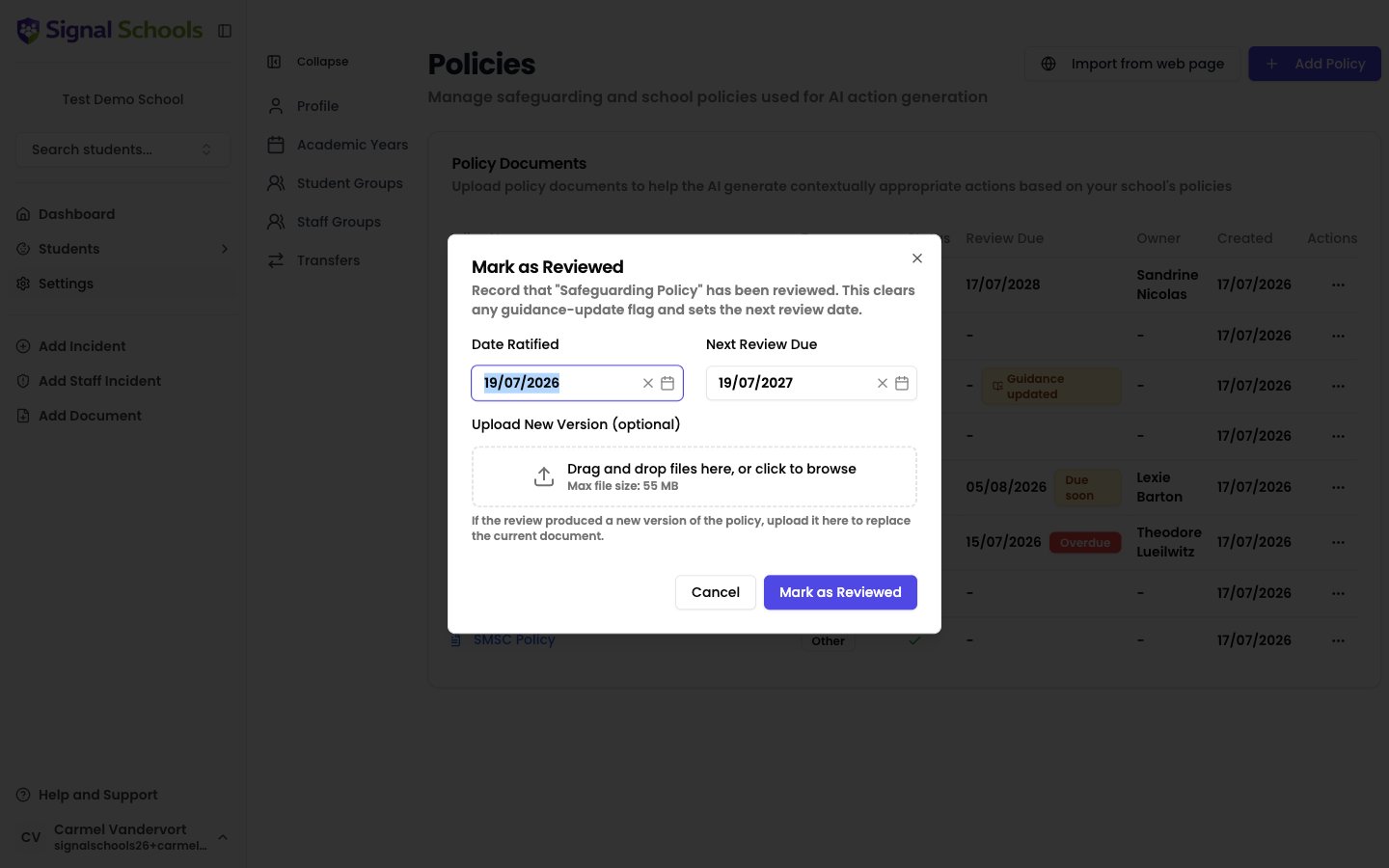
The dialog pre-fills the **Date Ratified** with today's date and suggests the **Next Review Due** date from the policy's review frequency. Adjust either if needed.
### Upload a new version (optional)
If the review produced a revised policy document, upload it in the **Upload New Version** field. Signal replaces the current document and re-processes it so AI matching uses the new wording.
### Save
Click **Mark as Reviewed**. The review badges clear, any **Guidance updated** badge is removed, and the next review date is set. Marking as reviewed is the only thing that clears the **Guidance updated** badge.
## Marking a policy as reviewed
When a review is complete, record it in Signal so the badges clear and the next review date is set.
### Open the actions menu
Go to **Settings → Policies**, open the **⋯** actions menu on the policy's row, and choose **Mark as reviewed**.
### Confirm the dates
The dialog pre-fills the **Date Ratified** with today's date and suggests the **Next Review Due** date from the policy's review frequency. Adjust either if needed.
### Upload a new version (optional)
If the review produced a revised policy document, upload it in the **Upload New Version** field. Signal replaces the current document and re-processes it so AI matching uses the new wording.
### Save
Click **Mark as Reviewed**. The review badges clear, any **Guidance updated** badge is removed, and the next review date is set. Marking as reviewed is the only thing that clears the **Guidance updated** badge.
 Running an [AI review](/docs/policies/ai-policy-review) does not mark a policy as reviewed. The AI review is a tool to help you carry out the review — completing it is always a human decision, recorded with **Mark as reviewed**.