
Key components
Every action plan in Signal includes the following:Students
Most plans are for a single child. When two or more children need to work through something together — most often a conflict between them — you can put them all on one plan instead of writing the same intervention twice. This is called a joint plan. See Joint plans for two or more students below.Type
Each action plan has a type that describes what kind of intervention it is. Your school defines its own types — for example, Behavioural, Medical, Learning Support, or Pastoral. Types are fully configurable in settings.Content
The plan itself — what the intervention involves, what actions will be taken, and what outcomes are expected. You can write this manually or use Signal’s AI to generate a draft based on the plan type and linked incidents. You always review and edit the content before publishing.Linked incidents
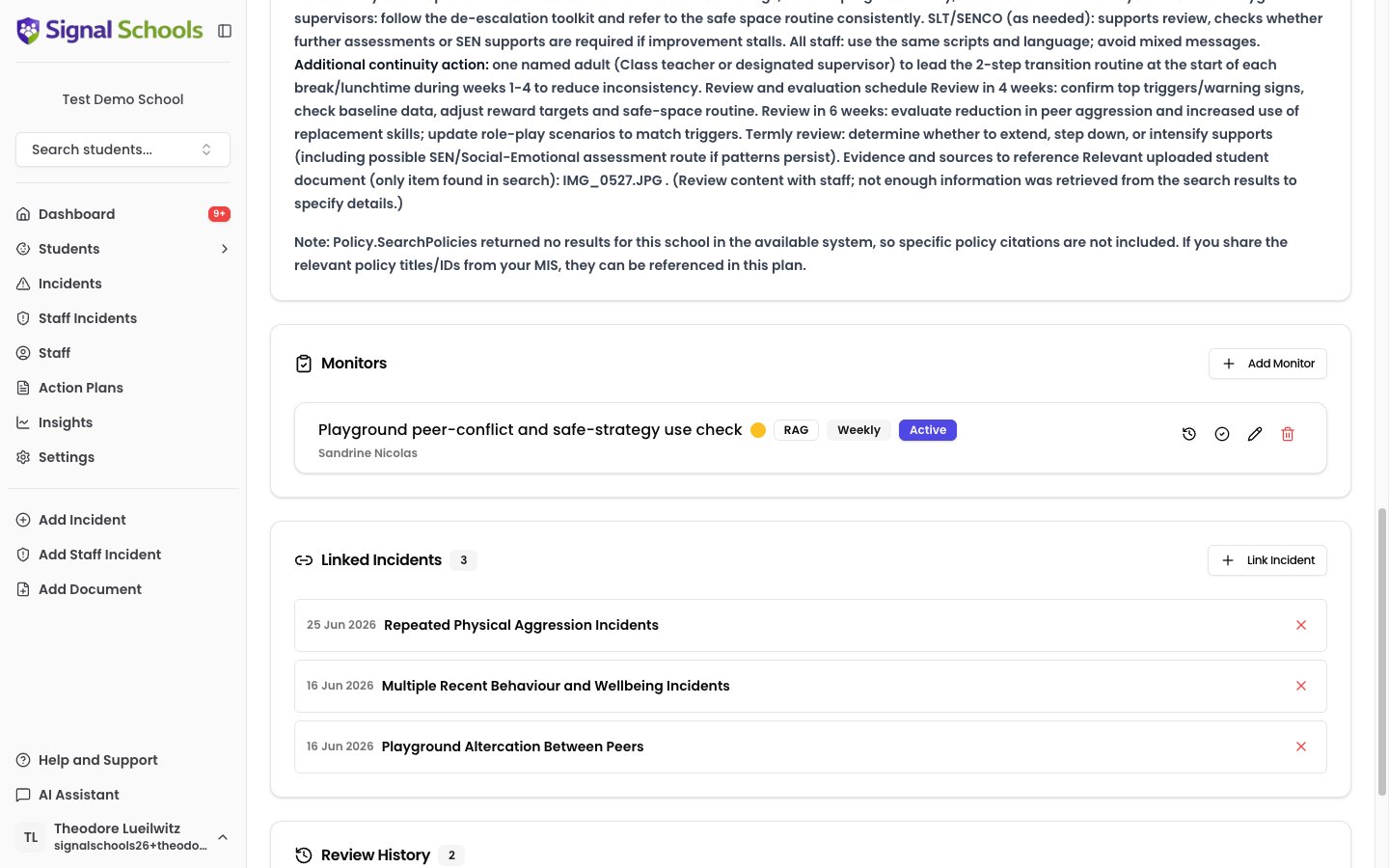
Action plans are connected to the student incidents that prompted or relate to the intervention. Linking incidents gives context to the plan and helps reviewers understand the safeguarding picture behind it.Reviews
Action plans can be scheduled for periodic review to assess progress and make adjustments. Upcoming reviews appear on your dashboard so nothing is missed. Signal’s AI can assist with the review process by analysing recent incidents and monitor data to suggest updates, highlighting what strategies are working and what needs to change.Monitors
Monitors are scheduled check-ins attached to the plan. They ensure ongoing oversight of the student’s progress between formal reviews. Each monitor is assigned to a staff member with a defined frequency. See Monitors & Check-ins for full details.Action plan lifecycle
An action plan follows a clear path from creation through to completion:- Create — set the type, choose the student or students, write or generate the plan content, and link relevant incidents.
- Active — the plan is live. Staff carry out the interventions, monitors track progress, and the plan is reviewed periodically.
- Review — at scheduled intervals, the plan is reviewed and updated. Reviews are recorded to build a history of decisions and changes.
- Complete — when the intervention is complete or no longer needed, the plan is marked as completed. All active monitors are automatically ended when a plan is completed. You can also download a PDF of the completed plan for your records.
Joint plans for two or more students
When two children are in conflict with each other, the intervention is usually one piece of work, not two. A joint plan lets you write it once: one set of agreed strategies, one review cycle, one record that everyone involved can see. A joint plan is for children working through something together. If one child has harmed another, the child who was harmed needs their own separate plan — a joint plan is not the place to record support for a victim alongside the person responsible.What is different about a joint plan
- The plan is one document. It describes shared strategies, supervision and separation arrangements, and restorative steps — not one section per child stapled together.
- It appears on every child’s profile. Each student on the plan shows the same plan under their Action Plans tab. It is one plan, not a copy each.
- Only shared incidents can be linked. When you link incidents, Signal offers only the incidents that involve every student on the plan — the incidents between them. This is what keeps a joint plan about the joint issue.
- Monitors can be shared or individual. A single check-in can cover the whole plan, or you can track one thing for one child and something different for another. See Monitors & Check-ins.
- Documents come from everyone on the plan. When you choose documents to guide AI drafting, you can pick from any student on the plan, and each document shows which child it belongs to.
Who can see a joint plan
This is deliberate: the plan is a single document that names every child on it, so there is no way to show part of it. Signal reminds you of this as soon as you add a second student, with the message “A joint plan. Staff restricted from any student on it will not see the plan at all.” If that is a problem for a particular child, write separate plans for each student instead.Adding and removing students
You can add a student to an existing plan at any time. You cannot remove one.Students can be added but never removed, because the plan already records work done with that child. If the grouping turns out to be wrong, complete the plan and start a new one with the right students.
When a student leaves
If a student on a plan is archived, the plan is automatically marked as completed and its monitors are ended — once a child has left, the joint intervention cannot continue as written. The completed plan stays visible on the remaining students’ profiles as part of their history. Restoring the student does not reopen the plan. If the intervention needs to resume, reopen it yourself or start a new one.Learn more
Creating & Managing Action Plans
Step-by-step guide to creating, editing, reviewing, and completing action plans.
Monitors & Check-ins
Set up scheduled check-ins to track student progress within an action plan.
Action plan types are configured in Settings > Action Plan Types. Your school can create as many types as needed to reflect the interventions you use.