
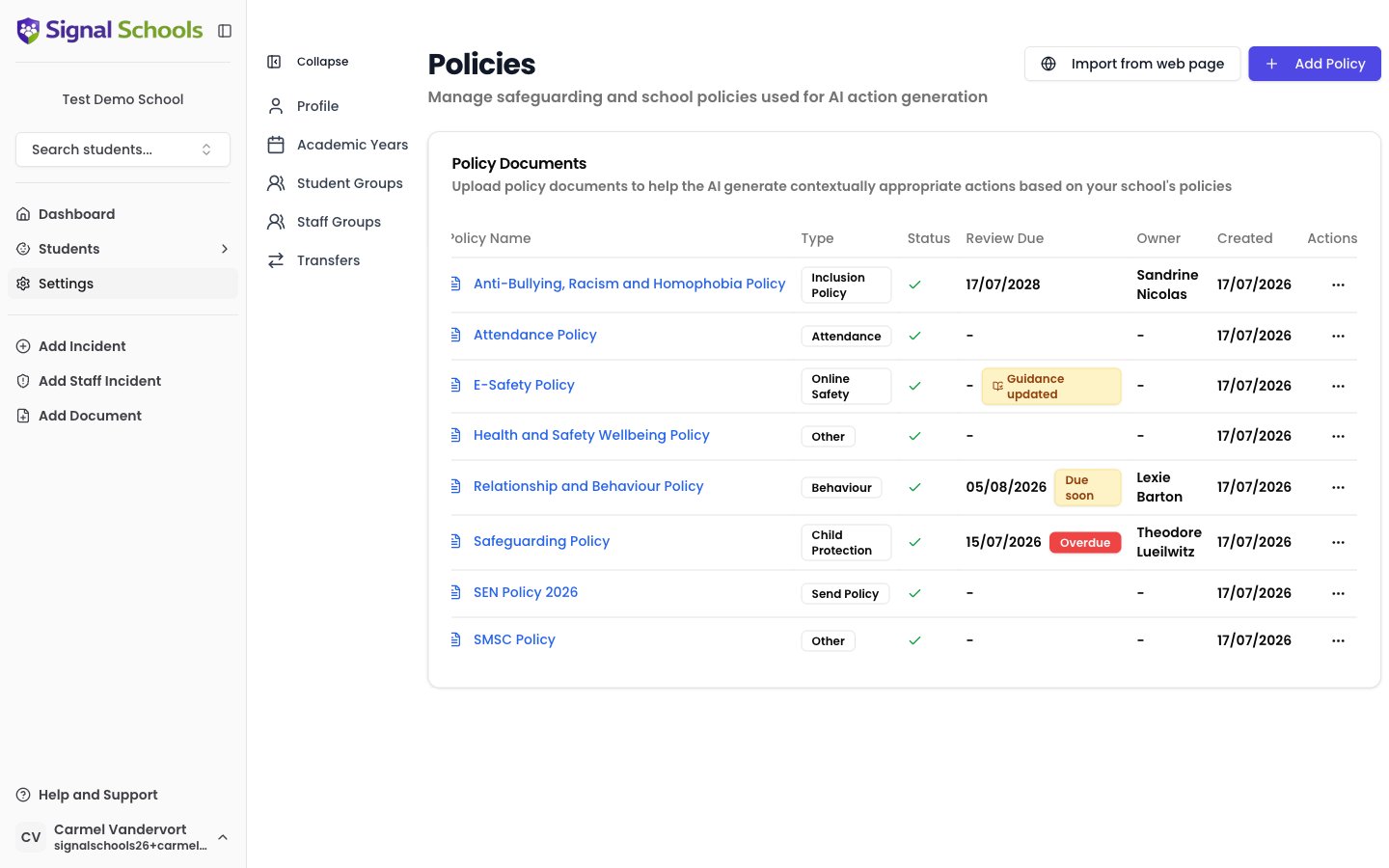
What policies are in Signal
Policies in Signal are your school’s own safeguarding and welfare policy documents. You upload the actual files — PDF or Word documents — and Signal stores them securely alongside your incident records. Once uploaded, policies serve three purposes:- Reference for staff — anyone recording or reviewing an incident can quickly access the relevant policy guidance without searching through shared drives or filing cabinets.
- AI matching — Signal’s AI reads your policy documents and automatically identifies which ones are relevant when an incident is recorded.
- Review assurance — Signal tracks when each policy is next due for review, reminds the right people, and can run an AI review comparing the policy against current government guidance.
Policy Types
Each policy is assigned a Policy Type that reflects its subject area:
Policy Types organise your policy library, improve the accuracy of AI matching, and determine which government guidance documents each policy is checked against during an AI review.
How AI uses your policies
When a staff member records an incident, Signal’s AI analyses the description and compares it against all uploaded policy documents. It identifies which policies are most relevant based on the content of both the incident and the policies themselves. This means staff can see which of your documents applies without having to search for it. The matched policies appear as badges on the incident; selecting one opens the document so the member of staff can read the procedure in full. The more policies you upload, the better the AI matching becomes. A comprehensive policy library gives Signal the fullest picture of your school’s procedures, leading to more accurate and useful recommendations.Keeping policies up to date
Signal helps you keep your policy suite current in three ways:- Review dates and reminders — set a review frequency and owner for each policy, and Signal flags policies that are due soon or overdue on the policies page, the dashboard, and in the daily digest. See Review Dates & Reminders.
- AI policy review — run an on-demand AI comparison of a policy against the current editions of relevant government guidance, producing a findings report with citations and suggested wording. See AI Policy Review.
- Government guidance monitoring — Signal checks GOV.UK weekly for new editions of key guidance such as Keeping Children Safe in Education. When guidance changes, a banner tells you what changed and which policies it affects, and those policies are flagged with a Guidance updated badge. See Guidance Update Alerts.
Learn more
Adding Policies
Upload, classify, and manage your school’s policy documents.
Review Dates & Reminders
Keep every policy on a review schedule with owners, reminders, and due-date tracking.
AI Policy Review
Check a policy against current government guidance and get a findings report.
Guidance Update Alerts
See when government guidance changes, what changed, and dismiss the alert.
Policies in Incidents
See how AI matches policies to incidents and how staff use them.
Adding, editing, or removing a policy needs the DSL, Deputy DSL, School Admin, or Owner role. Marking a policy as reviewed, running an AI review, and seeing guidance update alerts need Deputy DSL or above — School Admins cannot do these.Every member of staff can read the policies themselves, including those matched to an incident.