
You need the Deputy DSL, DSL, or Owner role to run AI reviews. The policy’s document must have finished processing (a green tick in the Status column) before a review can start.
Running a review
1
Open the actions menu
Go to Settings → Policies, open the ⋯ actions menu on the policy’s row, and choose Run AI review.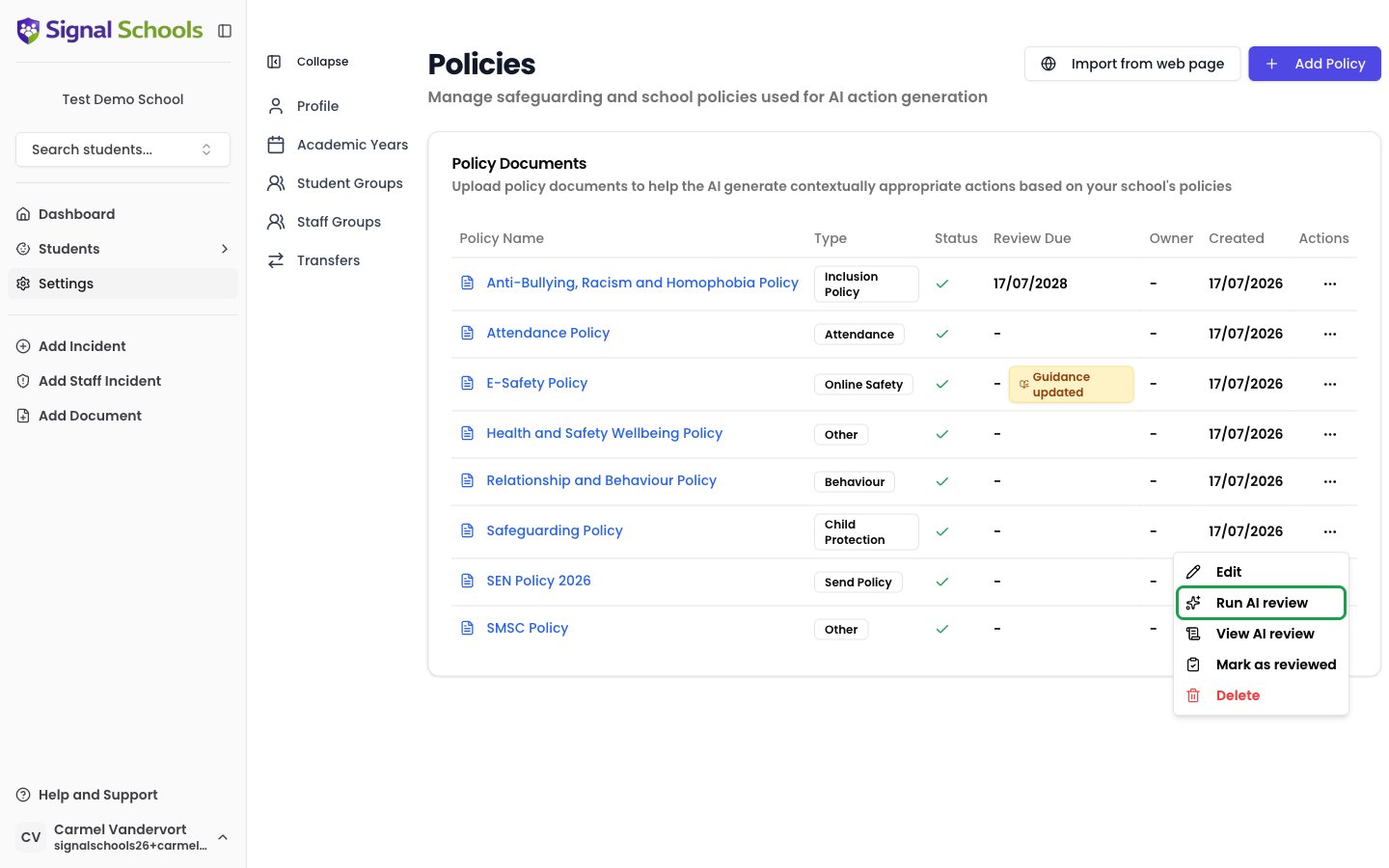
2
Wait for the report
Signal opens the review page and generates the report in the background — the page updates automatically when it is ready. A review typically takes a few minutes for a long policy.
3
Read the findings
The finished report opens on the same page. You can come back to it any time with View AI review in the policy’s actions menu.
Signal keeps the latest review for each policy. Running a new review replaces the previous report — useful after you have updated the policy and want to re-check it.
What the report contains
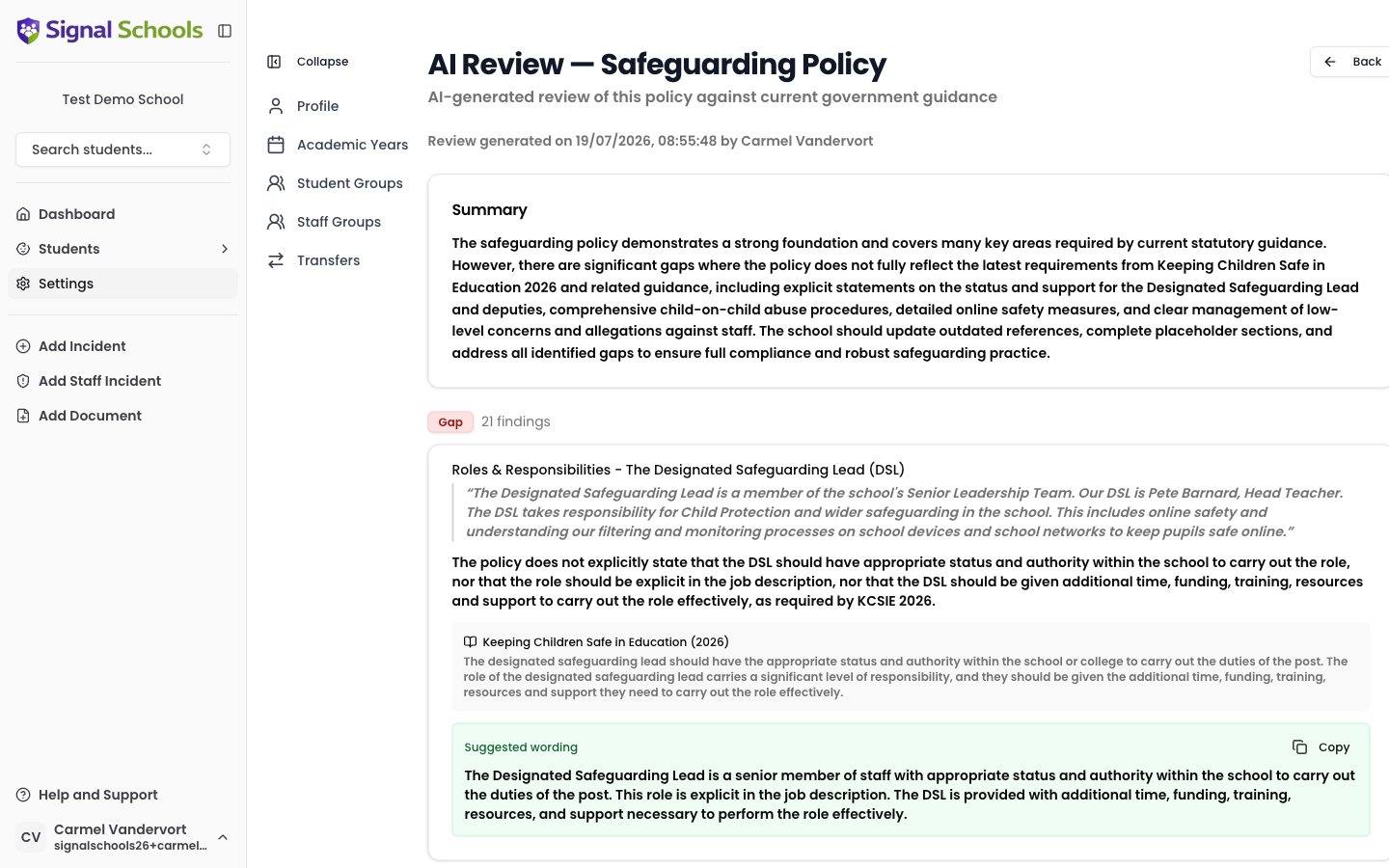
The report starts with a Summary — an overall assessment of how well the policy aligns with current guidance — followed by the individual findings, grouped by severity:
Each finding shows:
- The policy section it relates to, with the relevant excerpt quoted so you can find it in your document
- The issue — a plain-language explanation of what is missing, outdated, or could be improved
- A citation — the government guidance document and edition the finding is based on, with the relevant passage quoted
- Suggested wording — draft text you can copy with one click and adapt into your policy
Which guidance is used
Each policy is checked against the government guidance mapped to its Policy Type. Signal maintains a curated library of national guidance, including:- Keeping Children Safe in Education (KCSIE) — child protection & safeguarding, online safety, staff behaviour, safer recruitment, and children missing education policies
- Working Together to Safeguard Children — child protection & safeguarding policies
- Behaviour in Schools, Suspension and Permanent Exclusion, and Mobile Phones in Schools — behaviour policies
- Searching, Screening and Confiscation — behaviour and child protection policies
- Working Together to Improve School Attendance — attendance and children missing education policies
- SEND Code of Practice — SEND policies
- The Equality Act 2010 and Schools — inclusion and anti-bullying policies
- Allergy Safety in Schools — allergy safety policies
- Children Missing Education — children missing education, attendance, and child protection policies
Guidance stays current automatically
You do not need to tell Signal when the government publishes new guidance. Signal checks GOV.UK every week for new editions of every document in its library. When an update is found:- The new edition is brought into Signal automatically and replaces the old one, so future AI reviews always use the current guidance.
- A summary of what changed between editions is generated.
- A banner appears at the top of the policies page telling you which guidance changed and which of your policies it affects.
- Every policy whose type is informed by the updated guidance is marked with an amber Guidance updated badge — a signal that a review is recommended even if the policy’s review date is not yet due.

Using the review well
The AI review is advisory. It is a thorough first pass, not a substitute for professional judgement — findings should be verified against the cited guidance before you change your policy, and completing a review is always recorded by a person using Mark as reviewed.